Pounds NLIS requirements
When livestock are moved to and held at pounds, it is important to maintain accurate traceability records and meet all legal requirements.
The following requirements must be followed by pound operators.
Obtain a Property Identification Code (PIC)
- Ensure a PIC is registered to the property at which the pound is located.
- Ensure the PIC details are up to date.
Apply for, amend or cancel a PIC
Apply for a new property identification code (PIC) or amend or cancel an existing PIC online or by calling the Agriculture Victoria NLIS Helpline 1800 678 779.
Apply, amend or cancel onlineObtain a National Livestock Identification System (NLIS) account
A 'pound' NLIS account is required to complete a transfer onto the pound PIC or a 'sighted' transfer.
Access the NLIS database
If you already have an account, log in to access the NLIS database.
An NLIS account can also be obtained by calling the NLIS database helpdesk on 1800 683 111.
Ensure the owner/keeper of the impounded animals has a PIC
Owners and keepers of the following animals must legally have a PIC:
- cattle
- sheep
- goats
- pigs
- alpacas
- llamas
- deer
- horses
- camels
- 50 or more poultry.
If the source property of impounded livestock is known and the owner or keeper does not have a PIC and refuses to apply for one, email their details to livestocktraceability@agriculture.vic.gov.au.
Ensure all animals are NLIS tagged or tattooed
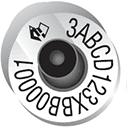
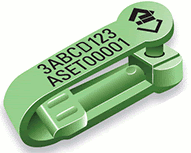
Impounded sheep, goats and cattle must be correctly identified with NLIS tags. If they are not already tagged with the owner or keeper's NLIS tag, a pound post-breeder tag bearing the pound PIC must be applied. The tag must be applied before the animals leave the pound.
- Orange post-breeder tags are used for cattle.
- Pink post-breeder tags are used for sheep and goats.
NLIS tags for cattle, sheep, goats and pigs
Order post-breeder tags online or call the Agriculture Victoria NLIS Helpline 1800 678 779.
Order onlineIf a pig does not have a tag or tattoo, contact Agriculture Victoria on 1800 678 779 for assistance.
If the source property of the livestock is unknown, or the animals are untagged, a permit from Agriculture Victoria is required before they are moved to the pound.
To apply for a permit, email livestocktraceability@agriculture.vic.gov.au.
In urgent animal welfare or emergency situations, Agriculture Victoria may be notified up to 7 days after the animals have been moved.
Ensure all NLIS tags are scanned or visually recorded
All cattle, sheep and goats at a pound must have their NLIS tags scanned or visually recorded. These tag numbers will be used in the NLIS transfer.
Ensure a NLIS transfer, or sighted transfer are completed on the NLIS database
A sighted transfer can be used when livestock are held at a pound for less than 7 days and then returned to the property they came from. Livestock kept at the pound for more than 7 days, or moved to a different property, must be transferred onto the pound PIC.
- Log onto the NLIS database
- Choose what livestock species you want to work with
- Notify the database of:
- livestock moved onto my property (full NLIS transfer onto the pound PIC)
- sighted livestock (simplified transfer)
- Enter the following data when completing a full NLIS transfer or a sighted transfer:
- NLIS tag numbers for each animal
- PIC of the property the animals arrived from – this is entered into the comments box for the sighted transfer
- date the animals arrived at the pound
The NLIS transfer to the pound PIC, or a sighted transfer, must be completed within 2 days of the animal arriving at the pound, or before it leaves the pound, whichever comes first.
For information on completing a full or sighted transfer, visit the NLIS website or contact the NLIS database helpdesk on 1800 683 111.
Ensure the movement of pigs on the PigPass database is completed
All pigs at a pound must have their movement reported on the PigPass database.
For more information, visit the PigPass website or contact the PigPass helpdesk on 1800 001 458.