About the Agriculture Victoria website
On this page
Purpose
The website is often the first and only point of contact people have with Agriculture Victoria. It supports Agriculture Victoria’s digital-first self-service approach.
The website is a one-stop shop for our audiences’ information needs and Agriculture Victoria’s services. The website attracts around 3.9 million views from over 2 million users per year to access information and advice, and complete tasks.
The website provides practical and succinct information for a wide variety of users. It provides users with clear pathways to access resources and act on information. Its purpose is to:
- provide factual, relevant and up-to-date information for our key audiences
- provide information about Agriculture Victoria’s legislative responsibilities and support compliance with regulations.
- share information about Agriculture Victoria’s priorities, initiatives, actions, activities and programs
Audience
Primary audience
The website serves a wide range of audiences, including those engaged in the agriculture industry and the broader public. These include as primary audiences:
- farmers and producers
- service providers
- community members.
Secondary audiences:
- Media and industry bodies, which have a relationship with Agriculture Victoria’s key audiences
- Collaborators such as universities, investors or other government agencies, which may partner with Agriculture Victoria.
Key principles
Agriculture Victoria’s audiences are busy. There are some principles that make it easier for our audiences to find, understand and act on our content.
Website principles
In line with the Victorian Government’s digital guidelines:
The needs of Agriculture Victoria’s external audiences underpin all content, structure and design decisions. We align with what users want and need instead of focusing on internal structures.
Our website must be easy to read and navigate. This means we plan content with digital best practice in mind. Website content is always created as an HTML page and designed with a mobile-first approach. PDFs and Word documents are only included if user research shows a clear user need.
We help users easily find the information or services they need, regardless of whether they are a first-time user or a frequent visitor.
We make sure our website is as effective as possible by making the content easy to read and navigate.
Content principles
All website content must have a clear purpose and align with business area priorities. Content is designed to service internal and external audiences but is not a library or repository for organisational content. The focus is on the end user and their content needs.
Sixty percent of Agriculture Victoria audiences access content via phone or tablet. Users are time poor, so we need to make information easy to find by keeping content as short and sharp as possible.
We help users to quickly find and understand the information they need by:
- including clear headings and subheadings
- explaining any complex terminology
- using short sentences and paragraphs
- using plain English
A consistent approach to content means users know what to expect. We use consistent tone and language.
Our content is designed to support our users. What else do they need to know? What do we want them to do next? We provide clear links and calls to action to help them answer a question or complete a task.
Repeated or overlapping content makes users (and search engines) work harder. We consolidate similar information or use internal links instead of repeating information across multiple pages.
See also: Content Creation Guidelines | Accessibility | Agriculture Victoria’s tone of voice | Plain language guidelines
See also: Content creation checklist
Website team timelines
We have a process for all new content and change requests. This prioritises urgent content such as emergency information and announcements.
Please provide the website team with as much notice as possible for any requests, particularly in relation to larger projects or major changes. Getting in contact early also means we can provide you with advice about your planned content, which can improve its usability and save you time.
If there are website updates that require ministerial approval, please let the website team know as early as possible. This allows the website team to work with you and provide timely advice.
If there are website updates that require ministerial approval, please let the website team know as early as possible. This allows the website team to work with you and provide timely advice.
Contact the web teamThe following timelines apply:
- Direct requests from the Minister’s Office or the Offices of the Secretary, Deputy Secretary or CEO: published as a priority. This requires confirmation from an executive director or director.
- Major changes: we will discuss timelines with you.
- Media releases: published within 3 to 5 hours of receiving a complete request.
- New or updated simple content pages (including events): at least 3 full business days after receiving a complete request.
Note that the usual timelines do not apply during an emergency response.
Defining ‘major changes’
‘Major changes’ are changes that have a bigger impact on the website than changing the text or images on a page. They take more time to complete, and the website team may come back to you with questions. Major changes can include:
- creation of multiple, linked pages (for example, for an emergency response)
- changing a page title, as this also affects the URL, Google Analytics data and search engine optimisation.
- creation of complex forms or tables
- restructuring content or making extensive text changes to an existing page.
Functionality such as interactive maps, tools and calculators also require detailed planning. They may need longer timelines or extra costs and often require engagement with external experts.
Website processes
Changing a page owner
If you’re changing roles or leaving Agriculture Victoria, you need to transfer ‘ownership’ to the person who will be responsible for the content.
Work with your manager to identify a suitable person and delegate the role, then:
- notify the website team with a new website request
- in the description, include the page URL, the former page owner and the new page owner
- put ‘Change page owner’ in the job title.
Not sure which pages you own? The content and knowledge article owners’ spreadsheet provides a list of all Agriculture Victoria page owners. This list is regularly updated and circulated to page owners.
Content processes
Creating new content pages
Creating a new page on the Agriculture Victoria website comes with an interaction cost for users – more clicks, more scrolling and a higher chance of getting lost in our content-rich environment.
Before requesting a new page, please follow these steps to a better user experience:
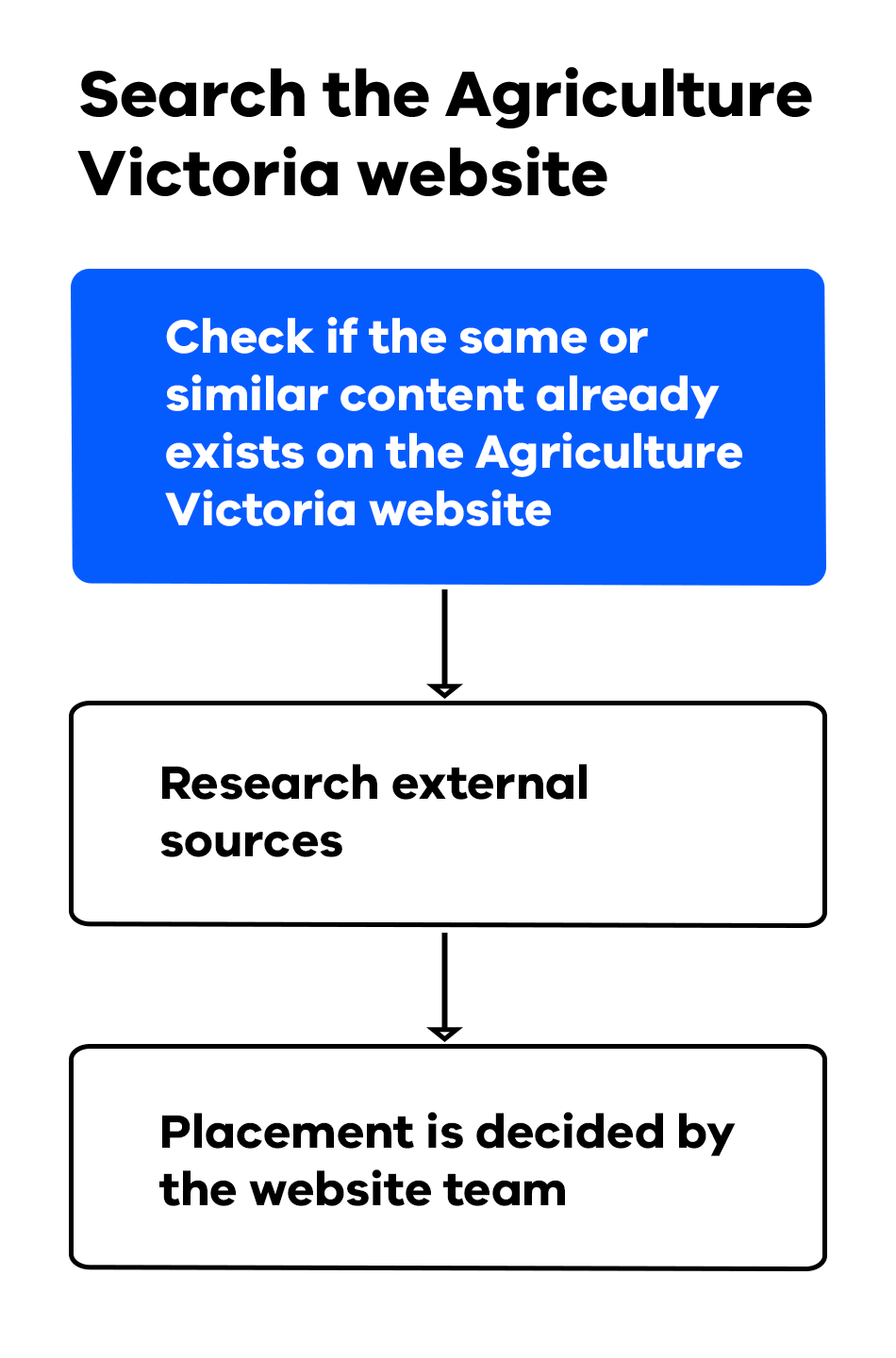
- Search the Agriculture Victoria website:
Check if the same or similar content already exists on the Agriculture Victoria website. This helps avoid duplication and keeps the site streamlined. New pages have an interaction cost for users. This cost is not finding the information quickly, more clicks, scrolling and getting lost on a content rich site. - Placement is decided by the website team:
The website team will work with the page owner to determine where any new page fits within the existing site structure and information architecture (IA). The website team will make the final decision on where the new page best sits in IA - Research external sources:
Use Google search to see if the content is already available on other government websites. If it is, consider linking to that information as a single source of truth. This reduces confusion and frustration for users.
Updating current content
- Engage with web team for strategic guidance, content planning and creation, including mapping the content’s location to the information architecture.
- Establish content approval through managers and subject matter experts.
- Create the new content page or section as a Word document.
- Review the content against the content creation checklist.
Submit the content to the website team
- Attach the approved Word document to a website request.
- Submit the website request. Respond to any follow up from web team.
- Include any files, images or videos as attachments, and indicate in the Word document where they will be located on the page. The maximum number of files is 5. You can provide additional files in a zip file (20 MB maximum).
- Check the website request is complete and you’ve provided all associated assets.
- Describe any formatting requirements for your content.
Archiving content
If a page is out of date or is no longer relevant, it should be archived. See the content review checklist for guidance. Note that archiving does not delete content, it simply means that users are unable to see it on the website.
Please note that archived webpages or documents may still appear in search engine results for a short period. Reach out to web team if you need help around this by raising web request.
Approvals
Page owners are responsible for their content on all assigned website pages. You are responsible for getting management approval for content via your existing lines of management. All website requests need to have the appropriate approvals prior to submission.