Working with the website team
On this page
As Agriculture Victoria Website and Community Engagement team are the custodians of the website, the team are responsible for its strategic direction. The website team looks after the website as a whole – from planning guidance to publishing, enhancing functionality, maintaining and archiving content. The website team handles both business-as-usual and emergency website requests.
The website team are here to support page owners to produce and publish best-practice content on the Agriculture Victoria website. The website team helps you work on the requirements needed to create new pages and update existing page and answer any questions.
To contact the website team directly, submit a website request or email website-edits@agriculture.vic.gov.au. For non-Agriculture Victoria website content, contact DEECA Digital Services.
Website roles and responsibilities
The main roles associated with the Agriculture Victoria website are:
- Program manager, Agriculture Victoria Website and Community Engagement
- Senior website advisor
- Website manager
- Website advisors
- Page owners (note: only one content person can own each page)
The following partners may also have responsibilities associated with, or input into, website content:
- Department of Jobs, Skills, Industry and Resources (DJSIR) online services team hosts and supports the Agriculture Victoria website.
- Squiz is an external supplier and may provide support for selected Agriculture Victoria website projects.
See also: Website processes
Strategic planning support
Alongside the publication of content pages, the website team supports page owners with guidance for new content and digital projects.
New projects and initiatives
The Agriculture Victoria website and community engagement team will work with you on advice and planning for new initiatives. Please involve us early to help save time, energy and resources.
Business needs should drive and underpin new projects or initiatives, and they should comply with digital standards and align with our organisational priorities.
Note that there could be a charge associated with a project passed on by a partner organisation.
To help the website team (and you) shape the thinking around new projects or initiatives, you will be asked to prepare a simple business canvas.
Business canvas
The business canvass is a one-page document that captures some of the key information associated with your initiative. We can help you draft your business canvas. The canvas can be used to make sure different areas, including management, executive and delivery teams, have a shared understanding of the aims of your digital work.
Large digital projects
Large digital projects (for example, moving content from another website to the Agriculture Victoria website of 10 or more pages):
- require more time
- may require extra budget
- may require engagement with the Department of Jobs, Skills, Industry and Regions (DJSIR) Online Services Team or third parties.
Larger or more complex projects require deeper consideration. Complex analytics reports, new content areas or changes to functionality all fall into this category. This work is assessed on a case-by-case basis to ensure compliance with digital standards and alignment with business needs.
If you are planning a project, submit a website request and provide as much detail as possible in the description field. We will contact you to discuss your project.
Other website team services
The website team can provide support across a number of business-as-usual (BAU) services. Requests that sit outside the basic business as usual services may attract extra costs and require longer timelines.
Vanity (smart or custom short) URLs
Vanity (smart) URLs provide a short URL for a website page. Aim to limit their use. Typically, they will only be used in instances where the page URL will be shared but not linked (for example, in radio, TV or print). Vanity URLs can only be used for HTML pages.
To request a vanity URL, submit a website request, including the website URL (for example: https://agriculture.vic.gov.au/about/our-research/our-innovation-ecosystem/our-smartfarms).
The website team will recommend a vanity URL for the page (for example: https://agriculture.vic.gov.au/smartfarms).
Forms
The website team can design simple website forms on your behalf. Contact the website team via email or the website request form to discuss your form in advance of deeper work or planning. Forms can be complex and require longer lead times ahead of publishing, so please give the website team plenty of notice if you need to create a form. We will work with you on more complex interactive forms to provide the guidance you need to best serve your audiences.
It is the responsibility of page owners to ensure that the request for personal information complies with Victorian Government privacy legislation. Forms also need to have a privacy statement which can be obtained from the DEECA Privacy team.
See also: Forms
Videos and YouTube videos
The website team can assist with basic requests, including:
- posting your video on the Agriculture Victoria YouTube channel
- adding your video to an existing YouTube playlist
- embedding your video on a website page
- adding closed captions – this is a requirement for all videos
- embedding your video on a website page
- adding a transcript as a dropdown accordion attached to the base of the video – this is a requirement for all videos.
The Agriculture Victoria YouTube channel does not host webinars or internal training videos. Only videos that are 3 minutes or less can be published on the Agriculture Victoria website. This ensures the website content is more engaging and easier to consume. Vimeo is the best place to publish longform videos.
See also: Videos
Google Analytics
Google Analytics is the service that the website team uses to provide website statistics.
We can provide you with a Google Analytics report for specific website pages. This report often covers the following:
- Number of times the page is viewed
- Number of active users (people who interact with the site)
- Number of times a user visits the page
- Time spent on page
- How many times a document has been downloaded
If you require more detailed information, then please provide the website team with:
- a list of URLs for the page(s) you’d like analytics for
- the date range you’d like covered (for example, 6 or 12 months).
Alternatively, we can set up a dashboard for real-time reporting (for example, in an emergency response). This is likely to take more time.
To obtain a Google Analytics reports, submit a website request.
Submitting a website request
A website request is the first step in working with the website team. Please submit a request for tasks including:
- guidance on planned new content
- updating or publishing website content
- archiving existing website content
- changing a page’s page owner
- other website team services.
Only requests with all the required information (including dates, links and videos) will be processed. Do not submit a website request unless your content is approved. Placeholder tickets with draft content pending approvals lead to delays or create version control issues and can lead to incorrect information being published. To make a website request:
- go to the Agriculture Victoria website request form
- complete the required fields and submit the request.
You must ensure the website request is complete and all assets for the request (including text, images, videos, maps) have been provided. The maximum number of files that can be included is 5. You can provide other files in a zip file (40 MB maximum).
Note: any files we add to a webpage (such as documents, PNGs, JPEGs or videos) are delivered to the user over a network. Many of our audience live in rural and regional locations with less bandwidth, which means longer page load times. Wherever you can, minimise file sizes. The web team can advise on how to achieve this.
Once you have submitted a request, you will receive an automated email from ServiceNow with a service request number and a link to the status of the request.
The website team will process the request.
You can add comments and view the request status via the ServiceNow ticketing system.
Website update request process
This figure shows the workflow of the website request ticketing process. See the accordion below for a text description of the steps.
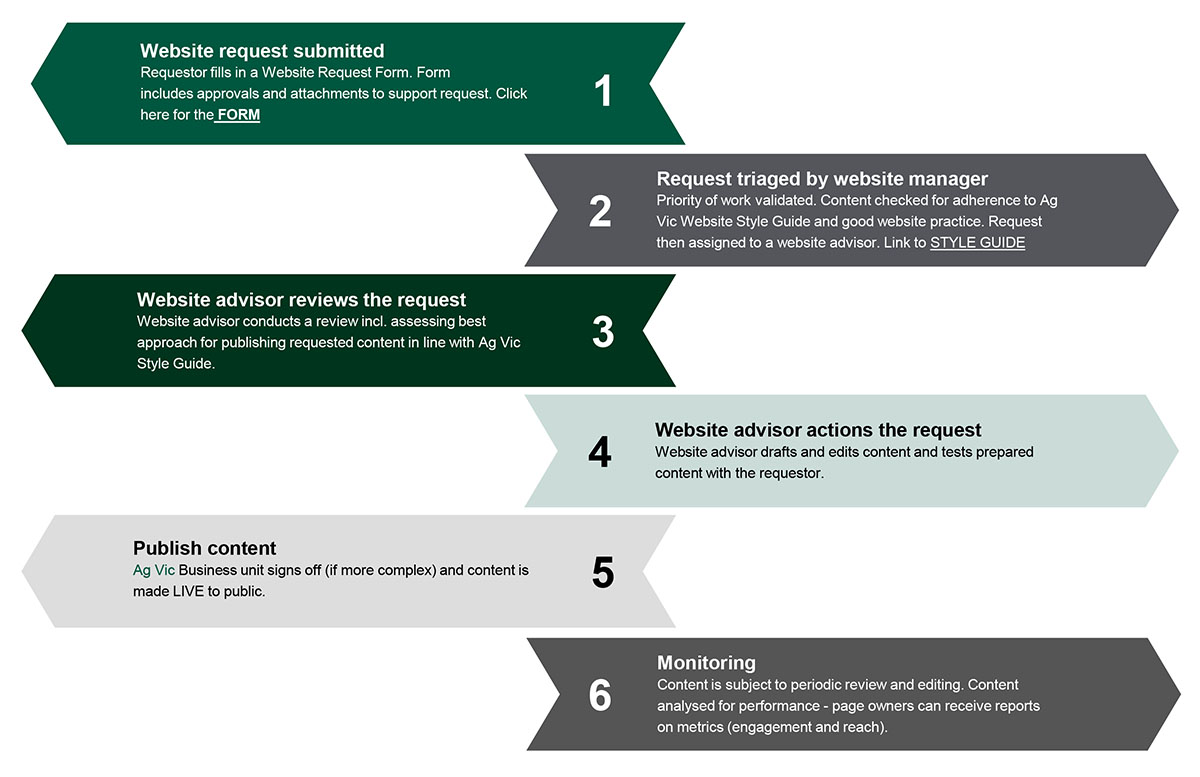
Requestor fills in a Website Request Form. Form includes approvals and attachments to support request. Open the form.
Priority of work validated. Content checked for adherence to Ag Vic website style guide and good website practice. Request then assigned to a website advisor.
Website advisor conducts a review, including assessing best approach for publishing requested content in line with Ag Vic website style guide.
Website advisor drafts and edits content and tests prepared content with the requestor.
Ag Vic business unit signs off (if more complex) and content is made live to public.
Content is subject to periodic review and editing. Content analysed for performance – page owners can receive reports on metrics (engagement and reach).
Content planning, creation, review and archiving
When you are creating content for the website, you’re not just putting words on a page. You’re also working out the best way to present that information and ensuring the content meets best practice. Content for other platforms, such as a fact sheet, will need to be edited for a website audience.
This section helps page owners understand what they should consider when planning, creating and reviewing content.
Content planning guide
Content planning helps ensure the content pages are clear, effective and meet best-practice digital and accessibility requirements. A content plan helps to:
- ensure your page provides value, and is an effective use of your user’s time
- understand what information your audience needs
- reduce duplication and the development of potentially unnecessary content
- outline what new content is needed
- develop a logical page structure
- create content in HTML and with accessibility principles in mind from the get-go.
Use the questions and steps in this guide as prompts to plan your content before you start writing.
To make sure your content provides value both to users and Agriculture Victoria, consider these questions:
- Why are you creating this content? If there is no clear reason for the content, consider whether it is necessary?
- Does user research, Agriculture Victoria data or feedback (objective from a third party) indicate that users need this information?
- Is there a current or potential issue that means that users will need the information?
- Does it support an organisational need? Does it help Agriculture Victoria fulfil its role (for example, meet regulatory requirements)? Does it support an Agriculture Victoria initiative or program? If yes, will users need or use this information?
- Is it a legal requirement for Agriculture Victoria to publish the information?
- Is this a topic where Agriculture Victoria is considered an expert or a primary source of information? If not, consider if there are other reputable partners or agencies that provide this information.
- Does the content’s value or impact warrant the time, resource or budget required to create and maintain it?
- What do you want users to do after consuming the content? (For example, report a state prohibited weed or apply techniques to reduce methane emissions.) If there is no clear outcome from the content, consider whether it is necessary.
To make sure your planned content is as effective as possible, ask yourself:
- Who are you trying to reach with this content?
- How will this content support them or provide value to them?
- What do they know already? And what do they want to know from this content?
- What are their preferences and behaviours when it comes to content? For example, do they want practical information? Do they access information on mobile or desktop? Do they prefer text content or video?
- What vocabulary or terminology do they use to talk about the topic? Including your audiences’ preferred terminology in headings and text will help to increase the content’s visibility in Google and internal search.
- Where possible, conduct user research and review existing data to answer these questions. Often this can be as simple as talking to the people who are your audience.
To avoid creating duplicated or inconsistent information, or spending unnecessary time on content creation:
- Identify existing information on the Agriculture Victoria website that is related to your topic. The website team can help you with this.
- Evaluate the effectiveness of existing content, including any gaps. Does your planned page offer new information, or should it be consolidated with existing page(s)? You may need to work with another page owner to combine, rework, add or split out content as needed.
- Where related – but different – information already exists, make a note. You can link to these pages from your content page to help users find the information they need.
- Review the Victorian Government accessibility guidelines. Website content should always be published in HTML format as the default.
- To help with accessibility avoid using PDFs. If user research shows that users need information in a document format, ensure that these are accessible and can be read by screen readers.
- If you need to publish long or complex information (for example, a report or research), the website team helps you to create user-friendly website pages. For further advice have a look at the report and long publications guidelines.
- If the content needs to be translated you will need to hire a translation service. The Victorian government has a policy on using translation services.
If you haven’t contacted the website team already, submit a website request to let them know that you are planning to create new content. The team can provide strategic planning guidance at this stage.
- Work out the key messages and topic areas for the page.
- Review the key website page elements guidelines and sketch out a structure for the page. Think about subheadings and what will go in each section.
- Determine if you need any supporting content, such as video or images.
- Think about what you want people to do after reading the content – for example, report an issue or apply for a grant.
- Consider how often the content needs to be updated, or whether it needs to be archived after a certain period.
Content creation checklist
Clear, easy-to-read content is critical. This checklist provides best-practice guidelines for the creation of website content.
See also: Key website page elements | Writing and style guide | Understanding accessibility | Understanding search engine optimisation
General content quality
- Does the page have a clear purpose and role? Is it distinct from other content on the site?
- Does the content give your audience the information they need? Is anything missing?
- Is the content factually correct and current?
- Is the content clear, succinct and well-written?
- Does it adhere to the Agriculture Victoria website style guide, key messages, tone of voice and visual guidelines?
Findability and search engine optimisation
Each page needs to have a title that is both unique, descriptive and reflect content on the page. Titles need to be between 30 to 70 characters long. Avoid the use of acronyms in a title unless there is evidence that the acronym is well known, for example, COVID.
Note that the page title becomes the URL for the page, so best to keep the title short.
- Is the page title (heading 1) clear and specific? Can it be understood without the context of the surrounding pages?
- Does the page title and content include words and terminology used by your audience?
- Have keywords been used naturally in key elements (for example, page title, headings) and throughout the text?
Readability and structure
- Does the page begin with a concise introduction that clearly explains what the content is about and why it matters to users?
- Is information logically structured and ordered? Does the most important information sit higher up the page, so that it is more prominent?
- Does the page use clear, short subheads to break up text and flag relevant information?
- Does the page use short sentences (typically 15 to 20 words) and paragraphs that can be easily scanned?
- Does the writing follow plain English guidelines?
- Are any technical or complex terms explained?
Accessibility
Does it feature:
- content in HTML?
- use of a meaningful heading hierarchy (with heading 1 as the page heading, heading 2 for subheadings, heading 3 for sub-subheadings?
- alt text for images?
- a transcript and closed captions for any video embedded on the website page?
Action
Does it help users to take their next steps by:
- providing a clear call-to-action (if relevant)?
- including links to related content (such as events, grants or related information; if relevant)?
Checks and approvals
- Has the content been edited and proofread?
- Have you performed a spell check?
- Has the text been run through a readability application, such as Hemingway Editor? Content should be at Grade 8 reading level or lower.
- Have all the necessary approvals been received? If you are not the page owner, any edits must be approved by the page owner before content is submitted to the website team.
Content review checklist
Page owners will receive a system-generated reminder to review content pages every six months. It is important and expected that page owners regularly review content and ensure it is up to date. Content review ensures the site maintains its value for users. You can contact the website team to establish which pages you own.
This checklist guides you through the review process.
Value and relevance
Does this page still provide value to website users and Agriculture Victoria? If not, it should be archived – see the Archiving guide for a framework.
Accuracy and currency
- Is all content on the web page factually correct and current? This includes any pdfs, other documents or assets.
- Have there been any changes associated with the topic since the page was last updated that should be captured? (For example, new initiatives, new research or new recommended techniques.)
- Are all facts, figures and statistics up to date?
- Do links to other pages and external sites still work?
- Are contact details still valid? Note that we can only publish shared email addresses; individual contact details should not be provided.
Ongoing improvements
The website team can help you find ways to improve your content. Feel free to get in touch.
Other questions to consider:
- Does Agriculture Victoria data (for example, Google Analytics data or Customer Contact Centre reporting) or user research indicate that any information is missing or unclear?
- Can the page’s information be reworked or restructured to better support users’ needs?
Is there new content on the website that aligns or overlaps with the page’s content? If so, consider linking to or consolidating the content. You may need to work with another page owner to rework content.
If you’ve made changes to the website page, do you need to make any updates to knowledge articles on the same topic for the Customer Contact Centre?
Best practice
Have you assessed the content against these criteria:
- Findability and search engine optimisation
- Readability and structure
- Accessibility
- Action checklists for content creation
Does the content adhere to the Agriculture Victoria website Writing and style guide, key messages, tone of voice and visual guidelines?
Archiving guide
By archiving redundant or out of date content, we can reduce website ‘clutter’, ensure the site is accurate and user-friendly, and save time.
Archiving content means it is no longer visible on the website.
Legal requirements
The Freedom of Information Act 1982 gives people the right to request government information. However, Agriculture Victoria isn’t required to keep all information publicly available on its website. Website pages can be archived and managed in the website’s content management system (CMS) instead.
See also: Archive and record content (Australian Government APS Professions website)
Identifying content for archiving
Content should be assessed on a case-by-case basis. However, these are some signs that a page should be archived.
Relevance and currency
- The content was created for an event, campaign, initiative, project or issue (for example, an emergency response) that has finished.
- The information relates to outdated practices, technology or advice.
- The information relates to services or support that Agriculture Victoria no longer provides.
Value
- There is no clear role or purpose for the content.
- The content does not support a user need or an organisational objective.
- The content receives few views or low engagement. However, this should be assessed on a case-by-case basis in consultation with the website team.
- The resourcing, time and budget required to maintain the information is not reflected in the value or impact of the content.
Duplication
- The page contains the same – or similar – information to other pages on the website.
- The content has been superseded by newer or more comprehensive information.
- The page duplicates content from an external site that could potentially be linked to instead.
Archiving timeframes
Most time-sensitive content should be archived within 6 to 12 months but some variations may apply, as in the following table.
| Content type | When to archive |
|---|---|
| Campaign | Content should be archived at the end of the campaign or after 6 months. If campaign content provides ongoing value, this should be reworked into an evergreen content page. |
| Emergency response content | Content that is specific to the emergency should be reviewed immediately following stand-down, then follow a structured review process after this. It should be archived when it no longer is relevant. |
| Media release | Archive after 2 full calendar years have passed (i.e. in 2027, media releases going back to the start of 2025 will be available on the website. |
| Event | Archive after the event has been completed. Our content management system does this automatically. |
| Grant | Grants should be marked as ‘closed’ once applications shut. If the grant is not reopening, archive after 6 months. |
| Project, program or initiative | This content should be assessed for ongoing value to audiences, by the business area. |
| Research, report or data | Archive reports, statistical data or research that no longer provide audience value. |